
Last Updated on March 5, 2026
Table of Contents
The Shift to Local AI Infrastructure
The era of “Cloud-Only” AI is evolving. For professionals in legal, medical, and corporate sectors, the focus has shifted from “what can AI do” to “how can I run AI privately?”
While hyperscale models continue to expand in the cloud, a significant movement toward local-first AI is redefining how we interact with intelligence. By deploying large language models (LLMs) on your own hardware, you transition from a “tenant” in a third-party cloud to the owner of your own private AI host.
This shift provides two transformative advantages: data sovereignty and infrastructure independence. Processing data locally ensures that confidential drafts never leave your secure environment, eliminating the privacy risks and recurring “Cloud Tax” associated with subscriptions like Microsoft Copilot. By hosting models like Phi-4 locally, you unlock high-performance, low-latency AI assistance that is integrated directly into your Microsoft Word workflow—available 24/7, even without an internet connection.
This guide explores the Local AI Infrastructure—the specialized software stack that allows you to bypass monthly subscriptions and data privacy risks. By mastering these four pillars, you can turn your local machine into a high-performance drafting engine that rivals Microsoft Copilot, while keeping your data 100% on-site.
🛠️ The Local AI Ecosystem: From Setup to Strategy
To get the most out of AI-assisted writing in Microsoft Word, you need the right foundation. We have organized our knowledge base into core pillars designed to help you build your own secure, AI-powered drafting environment:
- Local AI Infrastructure Guide (This Page): – A curated collection of setups for running local AI on your own hardware. This guide details various host configurations and secure API connections, empowering you to build a custom, offline environment that keeps your professional drafts 100% private.
- Local LLM Benchmarks for Microsoft Word: A curated collection of performance data and empirical tests for top private models. This guide shows local LLMs by their effectiveness in professional tasks—such as contract review, text rewriting, and summarization—helping you select the suitable model for your specific tasks.
- Private AI Writing Workflows: Put your local setup into action with a growing collection of real-world use cases powered by the GPTLocalhost. Learn to manage your workflow with features for offline bulk rewriting, secure translation, and automated formatting—all while keeping your drafts strictly on your own hardware.
- Hybrid AI Strategy for Word: Maximize performance while minimizing costs by combining local models with pay-as-you-go cloud LLMs. This guide demonstrates how to use the “best of both worlds”—leveraging local privacy for sensitive drafting and cloud power for complex tasks—using LLM Proxy and smart local redaction techniques to ensure your most confidential data never leaves your machine.
The Four Pillars of Private AI
To run a reliable, private AI setup, you need a coordinated stack. We categorize these into four distinct layers:
1. Inference Engines: The Core Computational Power
The engine is the “brain” that runs the mathematical models. Unlike cloud AI, where the engine lives on a remote server, local inference engines utilize your own CPU or GPU.
- Key Tools: llama.cpp, vLLM, and EXL2.
- Read the Guide: Choosing the Best Inference Engine for Your Hardware
2. Local LLM Hosts: Your Interface & Server
Hosts act as the “management layer.” They take the raw engine and provide an API or a user interface so you can actually talk to the model.
- Key Tools: LM Studio (and LM Link), Transformer Lab, LiteLLM, Msty Studio, AnythingLLM, OpenLLM, KoboldCPP, Ollama, LocalAI, Xinference, and Jan.
3. Model Context Protocol (MCP): Secure Tool Integration
The newest addition to the stack, MCP allows your local AI to safely interact with your local data and tools without exposing them to the internet.
- Key Concept: Creating a secure bridge between your AI and your file system.
- Read the Guide: Understanding MCP Servers for Local Data Privacy
4. RAG Applications: Personal Knowledge Bases
Retrieval-Augmented Generation (RAG) allows your AI to “read” your specific documents. Instead of just knowing general facts, the AI uses your private files to provide contextually accurate answers.
- Key Tools: AnythingLLM, PrivateGPT.
- Read the Guide: Building a Local Knowledge Base with RAG
The Architecture of Privacy: Why a Private Copilot Alternative is Possible
The shift toward a Private Copilot Alternative is driven by a unique convergence of local hardware power and the flexibility of the Microsoft Office ecosystem. Traditionally, Word Add-ins are hosted on remote servers and distributed via Microsoft AppSource, requiring a constant data stream to the cloud. However, by leveraging Microsoft Word’s Developer Mode, we can bypass the cloud entirely.
Leveraging Developer Infrastructure for Data Sovereignty
Microsoft provides a developer manifest system designed to allow engineers to build and test software locally before production. By using this local-first entry point, an Add-in can access local resources that are typically restricted in cloud-based versions. This “Developer Bridge” is the secret to keeping your data on-site; it allows Microsoft Word to communicate directly with your own machine rather than a distant data center.
Bridging the Gap: GPTLocalhost for Microsoft Word
While powerful LLMs are now widely available for local use, the missing link has always been a seamless integration into the professional drafting environment. GPTLocalhost fills this gap. It acts as a specialized local connector that integrates Microsoft Word with the most robust Local AI Hosts available today, such as LM Studio, AnythingLLM , LiteLLM, Ollama, llama.cpp, LocalAI, KoboldCpp, and Xinference, etc.
A Seamless, Local Workflow
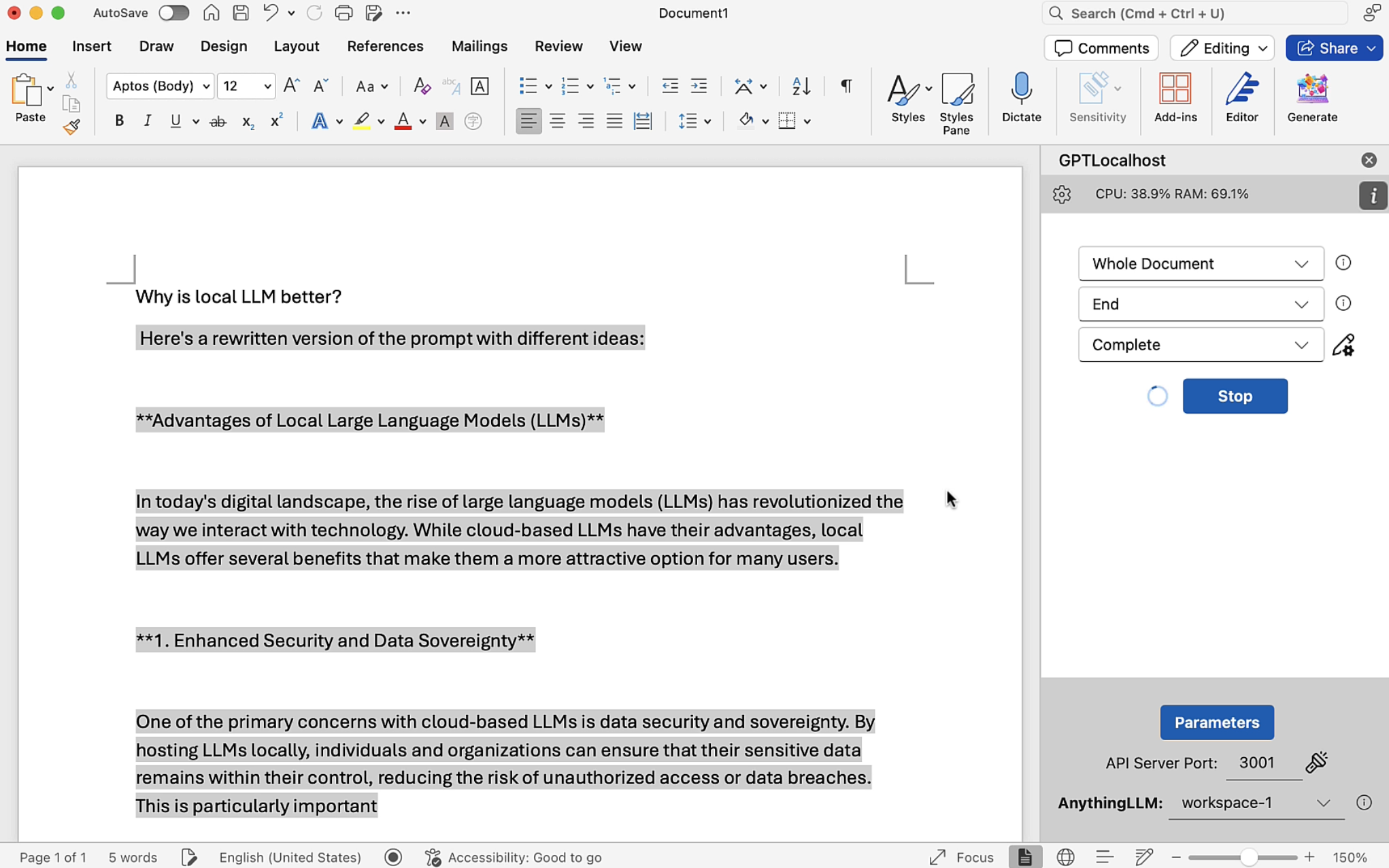
GPTLocalhost provides an intuitive interface (shown below) that simplifies the “Copilot” experience without the privacy trade-offs. You can define a specific text range as your input (such as a highlighted paragraph or the entire document), select your preferred output destination, and provide custom instructions—all within the familiar Word sidebar.
By routing these requests through your chosen Local AI Host, GPTLocalhost ensures that your creative process is enhanced by the world’s leading open-source models while your intellectual property remains 100% private.
Maximum Flexibility: Integrating Your Preferred AI Host for LLMs
For maximum flexibility and simplicity, GPTLocalhost does not bundle a specific LLM server during installation. This “Bring Your Own Host” (BYOH) approach ensures that you aren’t locked into a single technology. You can continue using your existing server setup or deploy a new one tailored to your specific hardware—whether that’s a high-end GPU workstation or a standard office laptop.
Universal Compatibility via OpenAI Standards
The local AI ecosystem is moving fast, with new hosting engines emerging monthly. GPTLocalhost future-proofs your workflow by adhering to the OpenAI API specification for chat completions. As long as your chosen AI Host provides an OpenAI-compatible endpoint, it will work seamlessly with GPTLocalhost.
Key Integration Principles
- Engine Agnostic: Whether you prefer the simplicity of LM Studio, the raw power of llama.cpp, or the enterprise routing of LiteLLM, GPTLocalhost acts as the universal bridge.
- Privacy by Default: Because you control the host, your data stays within your perimeter. There is no middleman and no external data logging.
- Simple Configuration: In most cases, integration is as simple as entering your local server’s address (e.g.,
http://localhost:1234/v1) into the GPTLocalhost settings. - Key Security and Proxies: If you opt to use an LLM proxy (like LiteLLM or LocalAI) to access cloud-based models, the API key is handled entirely at your chosen proxy layer. GPTLocalhost never accesses your keys and has no awareness of their existence, ensuring your credentials remain under your exclusive control.
At GPTLocalhost, we are changing the way AI is experienced by leveraging advanced models directly on your local device. We envision a future where high-performance AI is accessible, secure, and efficient for everyone—empowering you to scale your private AI stack without compromising on privacy or performance.
Benefits: Why Move to Local Infrastructure?
The following points illustrate the clear benefits of transitioning to a local-first AI infrastructure.
| Feature | Cloud AI (Copilot) | Local Infrastructure |
| Data Privacy | Processed on Cloud Servers | 100% On-Device |
| Costs | $20+/month per user | Zero Subscription |
| Offline Access | Requires Internet | Works Air-Gapped |
| Control | Fixed Model Versions | Swap Models Anytime |
Establish Your Local AI Infrastructure Today
The transition to a private, high-performance writing environment starts with choosing the right foundation. By moving away from cloud-locked services, you gain total control over your intellectual property and eliminate recurring subscription overhead.
Take Control of Your Data
Ready to transform Microsoft Word into a secure, private powerhouse? Deploying your own local AI stack is the most effective way to ensure data sovereignty without sacrificing productivity.
Download GPTLocalhost Now 👉 Experience the full capabilities of local AI integration firsthand. Start your journey toward a secure, professional-grade drafting environment today.
For answers to common technical questions, visit our FAQ section or reach out to our team at support@gptlocalhost.com. We are here to help you scale your infrastructure and redefine your professional writing workflow.