
Last Updated on December 14, 2025
Table of Contents
Introduction: The AI Dilemma in Professional Document Creation
Why using Local LLMs in Word? In the race to adopt Artificial Intelligence, many businesses and professionals face a difficult choice: sacrifice data privacy for the immense power of cloud-based Large Language Models (LLMs), or forego AI assistance entirely. Every time you send a proprietary draft or sensitive data to a remote server for analysis, you expose it to potential risks.
But what if you didn’t have to choose?
GPTLocalhost is built on a foundational belief: the future of AI productivity lies in the secure and efficient execution of Local LLMs in Word—running directly on your device, within your most critical daily application. This guide will explore why moving AI models from the remote cloud to your local machine is the necessary evolution for professional security, performance, and control.
Benefit 1: The Non-Negotiable Benefit: 100% Private and Completely Offline
The single most compelling reason to use Local LLMs in Word is data privacy. When the model runs on your machine, your data never leaves your device.
- 100% Data Privacy: Your documents, prompts, and generated content are never sent over the internet to a third-party server. This is crucial for handling proprietary, legal, medical, or confidential personal information.
- Complete Offline Functionality: With GPTLocalhost, you can register your device and run the LLM completely offline. Whether you are on a plane, in a secure facility, or simply have a poor internet connection, the full power of the AI remains available.
- Security Compliance: For industries with strict data governance requirements (HIPAA, GDPR, internal corporate policies), using Local LLMs in Word is often the only viable way to leverage cutting-edge AI technology legally and safely.
Benefit 2: Seamless Integration: Local LLMs Built for the Word Workflow
A powerful tool is useless if it disrupts the user experience. GPTLocalhost has been engineered to operate as a native part of Microsoft Word.
Automatic Markdown Conversion
One common hurdle when integrating LLMs is formatting. Most AI models output text in Markdown, which is not native to Word documents. Our solution automates this process:
- The local LLM generates its response (e.g., a bulleted list or a table).
- GPTLocalhost instantly converts the Markdown into perfectly formatted Microsoft Word rich text.
This seamless conversion elevates productivity, allowing you to focus purely on the content, not the cleanup.
Flexible Model Integration and Future-Proofing
The platform is designed to support a wide range of state-of-the-art models, ensuring you always have access to the latest breakthroughs. For instance, the integration of frameworks like Apple Intelligence in Microsoft Word demonstrates our commitment to leveraging on-device foundation models as they emerge, further cementing the local-first strategy.
Benefit 3: Specialized Intelligence: Matching Models to Specific Tasks
The flexibility of running Local LLMs in Word allows users to select specialized models tailored for different document needs, moving beyond the one-size-fits-all approach of general cloud models.
| Use Case | Example Models Supported | Benefit |
| General Drafting & Summarization | gpt-oss-20b, DeepSeek-R1-0528 | High-quality, balanced performance for everyday tasks. |
| Mathematical & Code Reasoning | Skywork-OR1-7B, Granite 3.3, Phi-4-Reasoning | Enhanced capabilities for generating and verifying complex technical or analytical content. |
| Creative Writing & Idea Generation | INTELLECT-2 (32B-parameter model) | Optimized for nuanced language, style, and imaginative output within a private environment. |
Benefit 4: The Case for “Right-Sized” AI: Why Local LLMs Outperform Cloud Giants in Word
There is a common misconception that bigger always means better in AI. While massive, multi-trillion-parameter cloud models are necessary for general web search and complex multi-modal tasks, they are often overkill for the targeted tasks performed daily inside Microsoft Word, such as drafting, summarizing, correcting, and reasoning.
This is where the concept of “right-sized” Local LLMs comes into play.
By utilizing highly optimized, smaller-footprint models, GPTLocalhost ensures that the AI runs instantaneously on standard modern hardware. These models are specifically fine-tuned for language tasks and deliver performance that is:
- More Efficient: Reduced computational overhead compared to accessing massive, general-purpose models.
- Highly Relevant: Focused on delivering high-quality, targeted results for document editing and generation.
The goal isn’t just to put AI in Word; it’s to embed a high-performing, right-sized intelligence that enhances your workflow without interruption.
Benefit 5: The Hybrid Future: Local Power, Cloud Option
While our priority is security and local performance, we understand that certain tasks may still require the immense scale of cloud providers.
GPTLocalhost offers a Seamless Hybrid Model through 3rd-party LLM proxy such as LiteLLM, allowing users to leverage:
- Local LLMs: For all private, daily drafting and sensitive tasks. No need to pay for tokens.
- Cloud LLMs: For occasional, large-scale, or highly generalized queries that do not involve sensitive data. Pay by tokens. No subscription fees.
This gives the user complete control, enabling a choice between maximum privacy and maximum scale on a per-query basis—all from within the familiar Word interface.
Conclusion: Take Control of Your AI Future
The era of blindly trusting proprietary data to remote servers is over. The capability to run Local LLMs in Word is not just a feature; it is a fundamental shift toward secure, private, and efficient professional document creation.
By adopting GPTLocalhost, you are choosing:
- Control over your data.
- Performance optimized for your tasks and devices.
- Flexibility to use the best AI models for every specialized task.
The power of AI is maximized when it is closest to the user and their data. Download GPTLocalhost today and experience the next generation of truly private, high-performance AI document creation.
See It In Action!
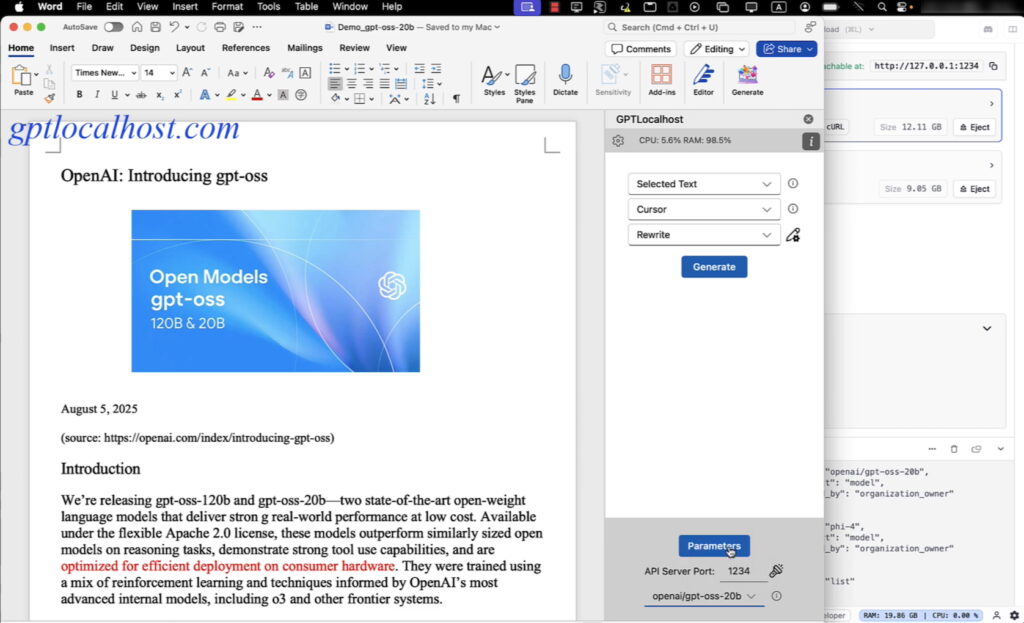
Experience the future of productivity with private, local AI! Watch a quick demo to see how you can seamlessly integrate OpenAI’s gpt-oss-20b directly into Microsoft Word, ensuring complete data privacy and eliminating monthly subscription fees.