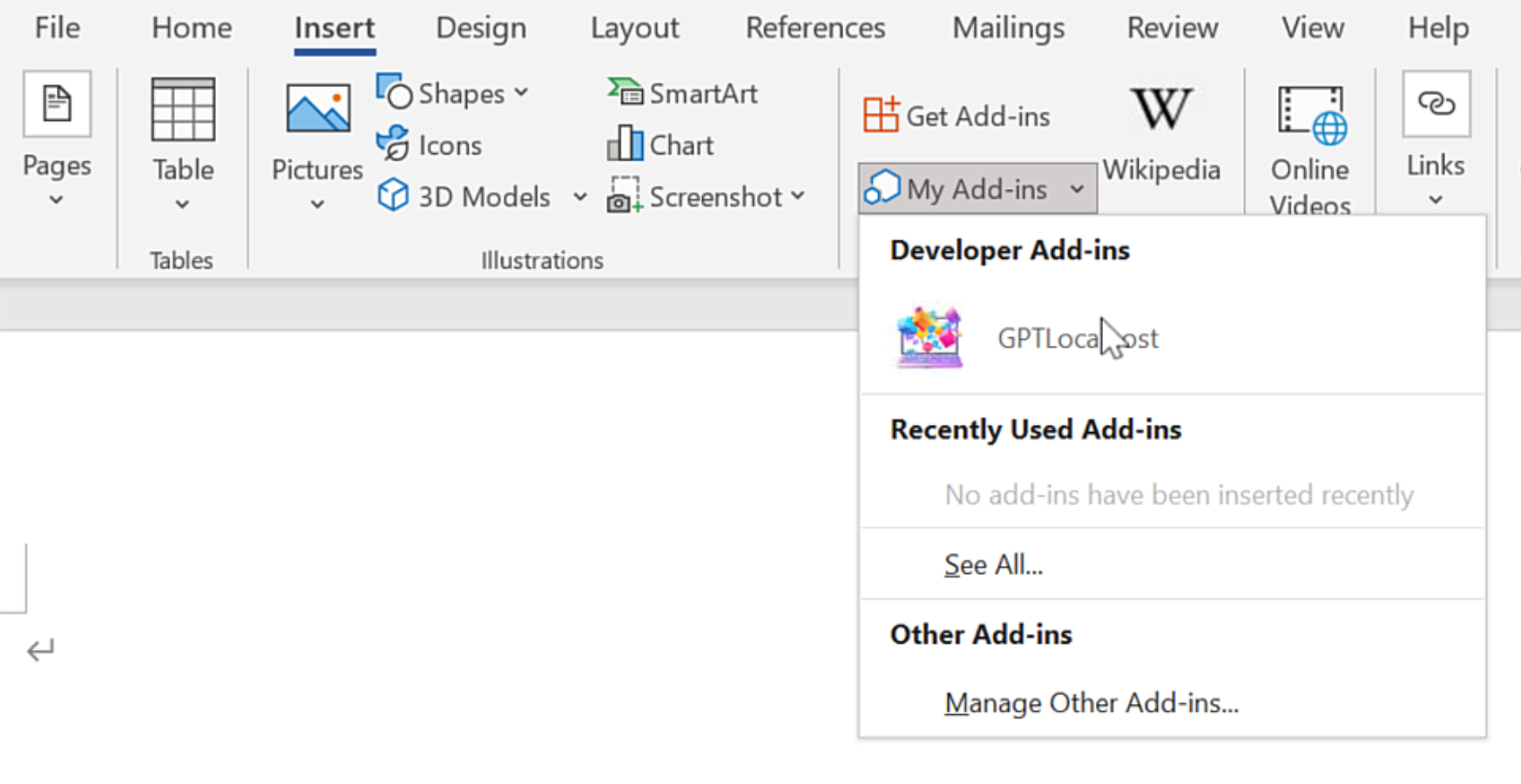
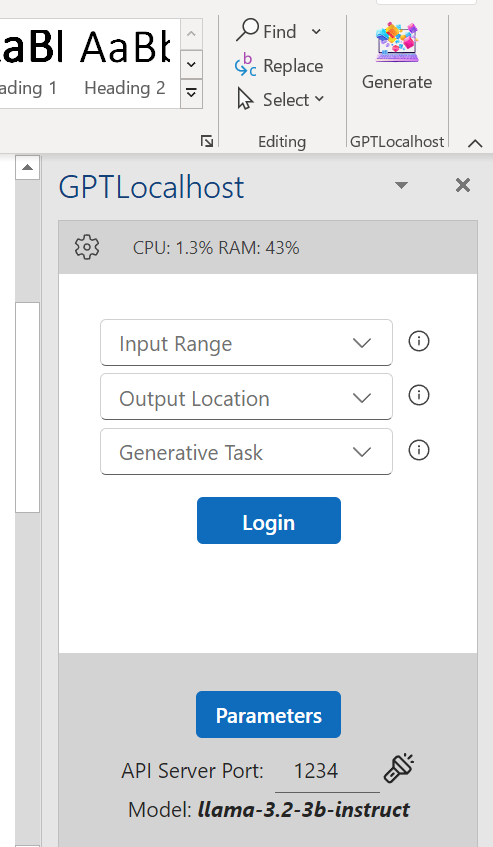
On Windows, “net share” is required for Microsoft Word to access the local Word Add-in.
In Microsoft Word, please install GPTLocalhost Add-in under “Developer Add-ins” to make it run locally.
After installation, you can now connect your favorite LLM server in Microsoft Word directly and locally.
Easily Summarize 10+ Pages in Microsoft Word using Local LLMs (100% Private).
Looking for a Microsoft Copilot alternative for summarization? Consider utilizing the power of Mistral NeMo, a cutting-edge 12B model with an impressive 128k context length, right within Microsoft read more
OpenLLM Local AI Host: A Private Copilot Alternative
Microsoft Copilot has demonstrated the power of AI-assisted writing, but for many professionals, a cloud-based model presents unnecessary privacy risks and recurring costs. As part of a specialized read more
Xinference Local AI Host: A Private Copilot Alternative
Looking for a Microsoft Copilot alternative without recurring inference costs? You might consider utilizing Xinference in combination with LLMs directly within Microsoft Word. Xinference is a robust and read more
KoboldCPP Local AI Host: A Private Copilot Alternative
Looking for a Microsoft Copilot alternative without recurring inference costs? You might consider utilizing KoboldCpp in combination with LLMs directly within Microsoft Word. KoboldCpp is an easy-to-use AI read more
Ollama Local AI Host: A Private Copilot Alternative
If you’re seeking an alternative to Microsoft Copilot that avoids recurring inference costs, consider using Ollama alongside local LLMs directly within Microsoft Word. Ollama is an open-source initiative read more
LocalAI Local AI Host: A Private Copilot Alternative
Looking for a Microsoft Copilot alternative without recurring inference costs? Consider using LocalAI with local LLMs directly within Microsoft Word. LocalAI is a free, open-source alternative to OpenAI read more
llama.cpp Local AI Host: A Private Copilot Alternative
Looking for a Microsoft Copilot alternative without recurring inference costs? Consider using llama.cpp with local LLMs directly within Microsoft Word. Llama.cpp is designed to facilitate LLM inference with read more
LM Studio Local AI Host: A Private Copilot Alternative
Looking for a Microsoft Copilot alternative without recurring inference costs? Consider LM Studio for seamless integration with local LLMs right within Microsoft Word. With LM Studio, you can read more
LiteLLM Local AI Host: A Private Copilot Alternative
Looking for a Microsoft Copilot alternative without recurring inference costs? Consider LiteLLM as a viable option. LiteLLM functions as an LLM Gateway, offering access to over 100 LLM read more
AnythingLLM Local AI Host: A Private Copilot Alternative
Looking for a Microsoft Copilot alternative without recurring inference costs? Consider using AnythingLLM with local LLMs directly within Microsoft Word. AnythingLLM aims to be the easiest to use, read more
Technical Control: How GPTLocalhost Secures Your Data
Most AI tools for Word are “Cloud Add-ins,” which act as windows to a remote server. GPTLocalhost is built differently. We utilize a specific architecture designed for local development and private sideloading, ensuring your data remains entirely under your total control.
The Microsoft “Local-Only” Advantage
According to the official Microsoft Office Add-in specification, the platform allows for “Localhost” manifests. This unique technical feature was originally designed by Microsoft to let developers build and test Add-ins locally without ever deploying them to a public cloud or external server.
GPTLocalhost leverages this specific loophole to provide 100% data ownership. By running as a local Add-in that communicates exclusively with your own machine, we guarantee:
No External Endpoints: Your text is never sent to a third-party API or cloud processing center.
The “Development” Security Standard: We treat your daily workspace with the same isolation that engineers use for top-secret prototypes.
Complete Private Ownership: Because the Add-in exists and runs entirely on your local server, you maintain absolute authority over your intellectual property.
Why This Matters for Professionals
For legal, medical, and financial professionals, a “Privacy Policy” is just a promise—but a local manifest is architectural proof. By utilizing Microsoft’s own local-only specs, GPTLocalhost provides total control over your data, bypassing the cloud vulnerabilities that affect tools like Microsoft Copilot and ChatGPT.